





HOW TO INVENTORY A JEWELRY BUSINESS
How to inventory a jewelry business efficiently: divide the job into small repeatable steps—identify each piece, count by showcase or department, investigate exceptions immediately, and keep a clear record of what changed. For stores that need faster physical counts, monitored displays, or staff alerts, the same workflow can be supported with item identification, portable readers, smart shelf monitoring, and software.
How to inventory a jewelry business step by step
Start with a master list of every sellable piece and assign each item a unique identity. Divide the store into practical counting zones such as Showcase 1, Showcase 2, bridal, watches, repair intake, stockroom, or safe. Count one zone at a time, compare the physical count with the expected list, and investigate missing or unexpected pieces before moving to the next zone.
- Define each showcase, tray, safe, stockroom, and transfer area as a separate inventory zone.
- Give every jewelry item one unique record and one consistent item identifier.
- Perform opening, closing, cycle, or exception counts by zone instead of waiting for a full-store count.
- Record authorized transfers, customer presentation, repair movement, sale, and return to stock.
- Investigate a mismatch immediately while staff still remember the most recent item movement.
How a smart shelf helps monitor jewelry between inventory counts
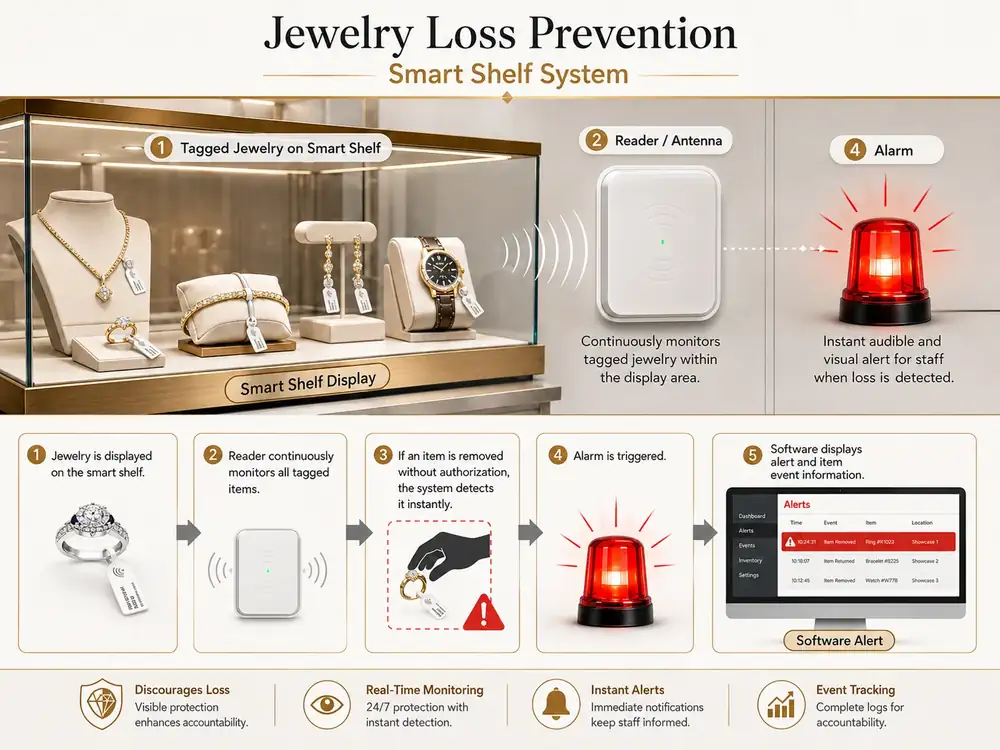
A smart shelf or monitored showcase continuously checks the tagged jewelry assigned to the display area. If a protected item is removed unexpectedly or stops meeting the expected read condition, the system can create an event and trigger a local alarm or software notification. This does not replace cameras, burglary protection, staff procedures, or physical showcase security. Its purpose is to add item-level awareness at the display.
During commissioning, test normal customer presentation, approved item removal, return to the showcase, sale, and a deliberately missing item. The accepted workflow should make normal sales activity easy while making an unexplained absence easier to investigate.

Fast jewelry inventory with a portable reader
For a fast physical inventory, staff can work through one showcase or department at a time and compare the items detected with the expected list. When the selected system uses RFID, a compatible portable reader can identify multiple tagged pieces wirelessly and can also help search for a specific item. The technology should be introduced only after the store has defined naming, zones, exception handling, and responsibility for reconciliation.
The practical goal is not simply to scan faster. It is to shorten the time between a discrepancy and the moment someone investigates it.
Portable counting and item search
A handheld reader is useful for cycle counts, opening and closing checks, finding a missing piece, and checking a tray or showcase without moving every item to a fixed station. Staff should follow the same route each time so results can be compared from one count to the next.

Mobile alerts for monitored jewelry events
When the project requires remote visibility, selected events can be forwarded to a mobile device or local computer. A mobile alert should tell the responsible employee what happened, when it happened, and which monitored zone or item requires attention. The alert is useful only when the store has a defined response procedure and avoids sending unnecessary notifications for normal customer service.
What a useful mobile notification should show
A practical notification can include the event type, time, monitored area, and the item or record associated with the event. Staff can then check the display, confirm whether the removal was authorized, and document the result. Mobile notifications should support the operating procedure rather than replace it.

Jewelry tags and item identification
Small jewelry pieces need identification that does not interfere with presentation or customer handling. Tag size, attachment method, orientation, and display materials should be tested with real rings, watches, bracelets, necklaces, and trays. If RFID is used, the tag and reader combination should be tested inside the actual showcase before the system is expanded across the store.
Keep item identity consistent from display to sale
The same item identity should follow the piece through display, customer presentation, transfer, repair, storage, inventory, and sale. This makes reconciliation easier and prevents separate spreadsheets or informal notes from creating duplicate or conflicting records.

A practical daily jewelry inventory routine
- Opening: confirm high-value showcases and exceptions carried over from the previous day.
- During the day: record transfers, repairs, customer presentation, approved removals, and returns to display.
- Cycle counts: count selected showcases or categories on a repeatable schedule.
- Exception review: investigate any mismatch before the next shift if possible.
- Closing: verify the most sensitive zones and document unresolved discrepancies.
What information is needed before choosing equipment
Before selecting hardware, document the approximate jewelry count, number and dimensions of showcases, current inventory method, how often staff count inventory, how pieces are presented to customers, and whether you need fast counting, display monitoring, mobile alerts, or a combination. Photos or a simple floor and showcase plan are usually more useful than choosing equipment from a catalog first.
Keep this planning guide separate from system selection
This page explains how to inventory a jewelry business and how smart shelf monitoring, fast counts, and mobile notifications can fit into that operating process. For current commercial system configurations, product options, or purchasing information, use the Fresh USA commercial pages rather than treating this planning guide as a product catalog.
For broader theft-prevention procedures, see Jewelry Store Theft Prevention. For complete security layers such as cameras, access control, alarms, and door protection, see Jewelry Store Security Systems.
Frequently asked questions about jewelry inventory
How often should a jewelry business count inventory?
The right schedule depends on item value, movement, staffing, and store procedure. Many businesses benefit from smaller recurring cycle counts by showcase or department in addition to a full inventory.
Can a jewelry store inventory items without scanning each barcode one by one?
Yes. Depending on the selected system, a portable reader can identify multiple properly tagged items during a physical count. The store still needs a clean item database and a defined reconciliation process.
What is the difference between fast inventory and smart shelf monitoring?
Fast inventory answers which items are physically present during a count. Smart shelf monitoring watches a defined display area continuously and can create an event when a protected item changes state unexpectedly.
Can jewelry staff receive mobile alerts?
Yes, when the selected configuration supports notifications. The useful alert should correspond to a defined event and a clear staff response procedure.
Does item monitoring replace cameras or store security?
No. Inventory and display monitoring complement cameras, intrusion protection, access control, physical showcases, and staff procedures.