




UNIFORM MANAGEMENT WORKFLOW
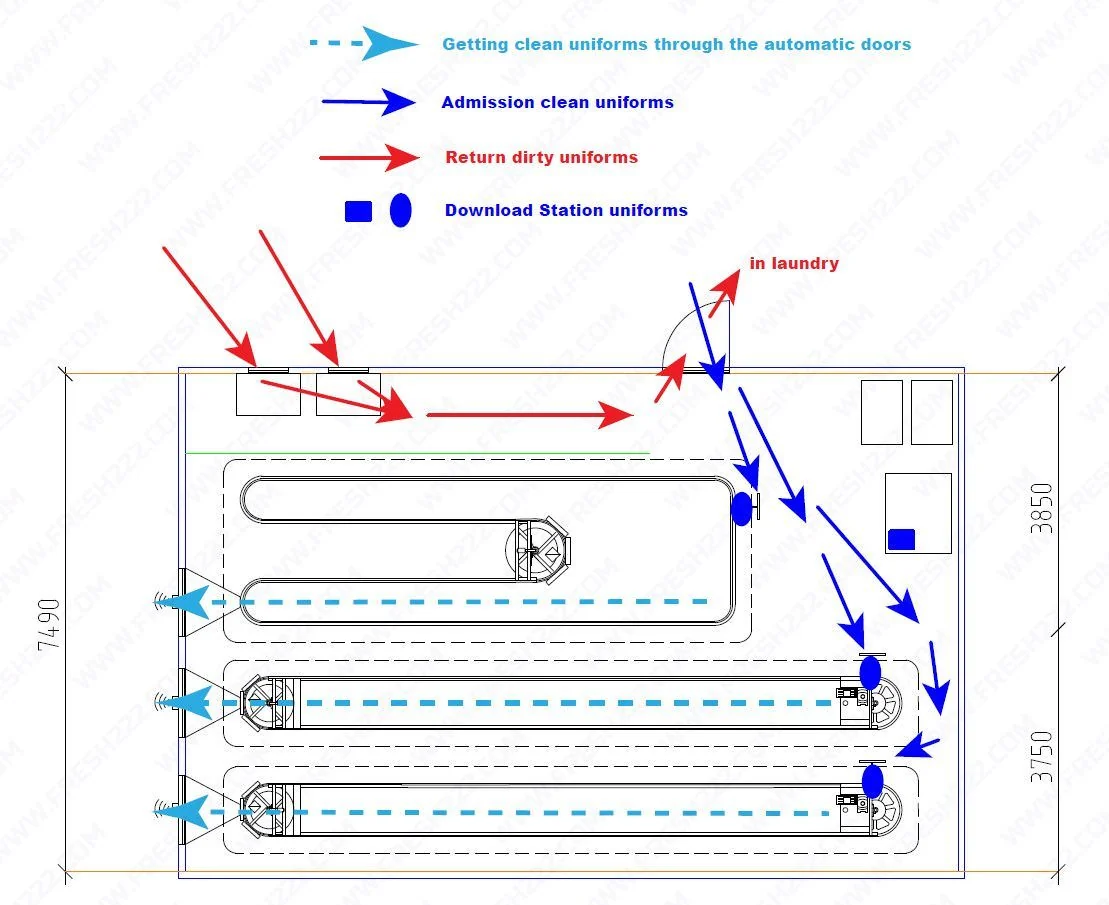
Automated Uniform Management Workflow should be planned around the real workflow. Automated uniform management is a circulation process: clean garments are stored, issued to employees, worn, returned and sent back through laundry. The storage hardware and software should support that full cycle instead of focusing only on the moment a uniform is dispensed. A practical automated uniform management workflow project starts with room dimensions, garment size and peak retrieval flow.
Automated Uniform Management Workflow: Map the employee uniform cycle
Document how new or clean garments enter storage, how employees receive the correct size or assignment, where used garments are returned and how laundry returns clean stock. Mark who owns each step. This prevents the common problem of automating issue while leaving return and restocking uncontrolled.
Design for shift change, not average demand
Hospitals, casinos, factories and other large employers can have hundreds of employees changing within a short window. Size the access and retrieval process around peak shift turnover. Several smaller issue points may outperform one large central point when departments are far apart.
Choose the right level of garment identity
Some operations only need to store garments by position or size. Others need item-level identity for assignment, laundry history or loss investigation. Individual tags and software are useful when that history affects operations; they are not mandatory for every motorized uniform-storage project.
Keep clean issue and used return separate
Used garments should have a simple return route that does not contaminate or confuse clean storage. A return bin, separate reader or independent workflow can record returns without forcing employees to rescan the same item at the clean issue point.
Use reporting for replenishment and accountability
Useful reports include garments issued, returned, missing or inactive, as well as stock by size or department. The purpose is to keep the correct uniforms available and identify exceptions. Avoid collecting data that no department is responsible for reviewing.
Common implementation mistakes
- Sizing only from total employees and ignoring simultaneous shift demand.
- Automating clean issue while leaving used return undefined.
- Assuming every garment must be individually tagged.
- No spare capacity for new employees, seasonality or damaged uniforms.
- Too many software rules before staff have learned the basic workflow.
- No clear ownership for data corrections and missing garments.
Information to prepare for a uniform project
Send employee count by shift, uniform types and sizes, garments per employee, current issue method, return method, laundry process and available room dimensions. Explain whether you need only faster storage/retrieval or full employee and garment history.
Related planning guides
A practical commissioning example
Uniform management should follow accountability from clean stock to employee issue and return. A common mistake is to automate storage while leaving issue records outside the process. If the goal is accountability, decide exactly when a uniform becomes assigned to an employee and what event marks its return. If the goal is only dense storage and fast retrieval, do not burden the workflow with unnecessary tracking fields. The system should match the management question.
How to validate the workflow before full rollout
Pilot with a small department or shift. Register representative garments, issue them to test employees, process returns and create a few exceptions such as a missing piece or a garment sent to repair. Ask supervisors to find the current status without relying on a separate spreadsheet. This confirms whether the proposed workflow actually improves accountability instead of just moving garments mechanically.
Decisions to make before ordering
- Is the main goal storage density, fast issue or employee accountability?
- Are uniforms individually assigned or pooled by size/type?
- What marks a garment as returned?
- How are repair and discard statuses handled?
- Which supervisors need reports or exception lists?
Write these answers into the project scope before comparing equipment. They create an acceptance target for the installer and a training reference for the employees who will use the system later. If one of the answers changes, update the scope before adding hardware so the installation continues to solve the operating problem described on this page.
Project handover and future expansion
For automated uniform management: issue, return and accountability, keep a short handover record with the final layout, equipment locations, naming convention, normal operating steps and the person responsible for routine changes. Record the settings that were proven during acceptance instead of relying on memory. This makes later service, staff training and expansion much easier.
Expansion should follow a new operational requirement: another entrance, a larger inventory, additional reports, a new department or a need for remote visibility. Add the smallest component that solves that new requirement while preserving the working first phase. A modular project is valuable because the original installation remains useful rather than becoming a disposable pilot.
Recommended implementation sequence
Pilot one department or shift before enrolling the full workforce. Load realistic uniform types, define how positions are assigned and test the complete issue-and-return routine. If employee identification or software is included, prove that layer after the mechanical storage workflow is stable. Create a few normal exceptions such as a missing piece, repair, replacement size or unreturned garment so supervisors know how the system represents them.
Use the pilot to decide which information is worth maintaining. A smaller accurate set of statuses and assignments is better than a complex database that employees stop updating. Expansion to more departments should reuse the working rules and naming convention established during the first phase.
Frequently asked questions
Can a uniform system work without individual RFID tags?
Yes. Motorized storage and position search can be useful without item-level tagging; RFID is added when the workflow needs individual identity.
Can employee credentials control access?
Employee identification can be part of a controlled issue system when compatible with the selected access method.
Should returns be automated too?
Return workflow should always be planned; the level of automation depends on the operating need.
Can the system expand to more departments?
Yes. A modular project can add storage, readers or software functions as the organization grows.